Quick answer. After this you can share your referral link and collect your rewards.
Open Invite & Earn
Under More at the bottom of the left menu, choose Invite & Earn.
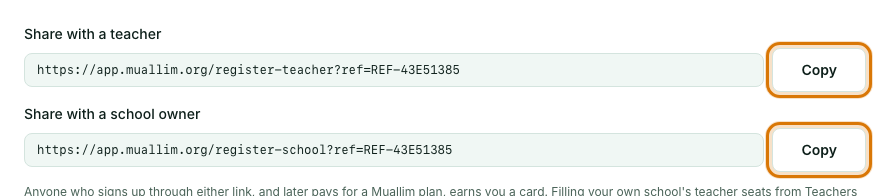
Copy your link
There are two links: Share with a teacher, and Share with a school owner. Select Copy next to the one you want and send it, for example on WhatsApp.
Wait for them to pay
When someone who signed up through your link pays for a Muallim plan for the first time, you earn a card. It appears under Your cards. Your referrals list shows who signed up and whether their purchase has earned a card.

Use your card
A card is worth one month of the plan they bought, and it never expires while it waits. Select Claim as premium credit to get 30 days of premium access from that moment, or ask for a payout: choose JazzCash or Bank transfer, enter your number or account details and select Confirm payout request.
Frequently asked questions
- How do I earn a reward for referring someone?
- Share your link from Invite & Earn. When someone who signed up through it pays for a plan for the first time, you earn a card worth one month of that plan.
- Does inviting a colleague to my own school earn a card?
- No. Inviting teachers from the Teachers page is separate. Only independent sign-ups through your referral link count.
- How many reward cards can I earn?
- Up to 12 in total. A card never expires while it waits, and you can claim it as 30 days of premium access or ask for a payout.
Ready to try it on your own class? The Free plan includes 10 AI generations in any 30 days. No card needed.
Keep reading
- Plans, billing and payments: What each plan includes, how to upgrade, and how to pay by bank transfer or JazzCash.
- Invite teachers to your school: Create an invite link, share it, and manage who has joined.