Quick answer. After this you can read your school's status at a glance and jump to what needs doing.
Overview is the first page a school admin sees. It tells you what is happening at your school today.
Get started checklist
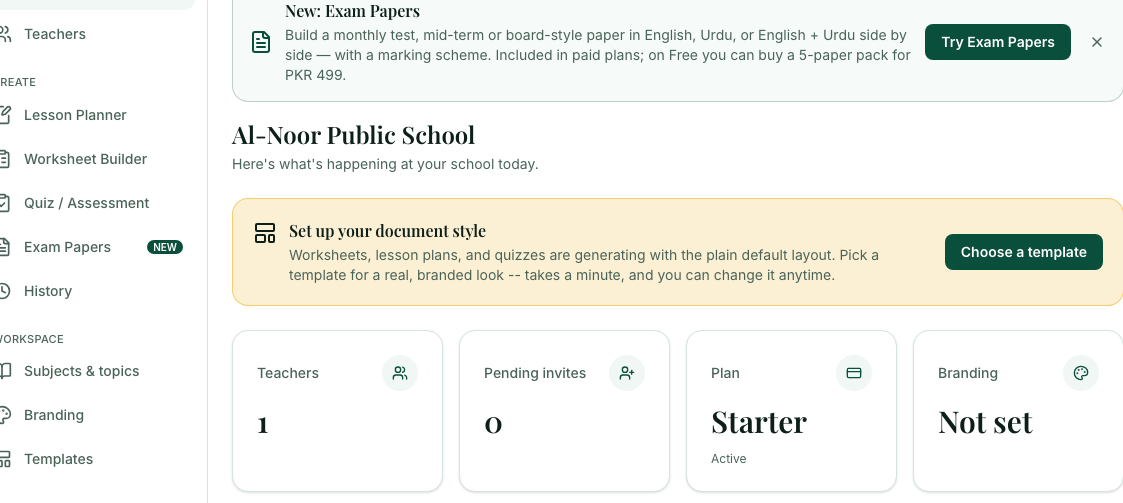
New schools see a Set up your school checklist at the top: choose a document style, add your logo, and invite your teachers. Each step ticks itself when it is done, and the checklist disappears when all three are done. You can hide it earlier with the X.
Set up your document style
Until you choose a template, a card reminds you that worksheets, lesson plans and quizzes use the plain default layout. Select Choose a template to fix it. The card goes away once you have chosen.
Four quick numbers
Teachers is how many people are on your roster. Pending invites are links you have sent that have not been used yet. Plan shows your plan and whether it is Active. Branding shows Set once you have uploaded a logo, and Not set until then.
Shortcut cards
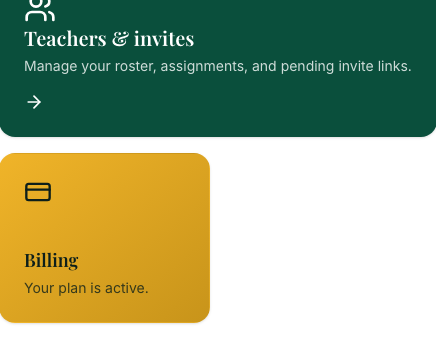
Teachers & invites opens your roster. Lesson Planner is for when you also teach a class. Branding opens the letterhead page. Billing shows that your plan is active and opens payment.
Teacher progress
For each teacher and class, the topics covered so far in the recommended teaching order, and what is next. It fills in as your teachers make lesson plans, worksheets, quizzes and papers.

Frequently asked questions
- What does Pending invites mean?
- It counts invite links you have sent that have not been used yet and have not expired.
- What does Branding: Not set mean?
- You have not uploaded a school logo yet. It changes to Set once you upload one under Branding.
- What is Teacher progress?
- A card showing, for each teacher and class, the topics covered so far in the recommended teaching order and what comes next.
Ready to set up your school? Register a school and start with a 7-day trial of School Starter or School Pro.
Keep reading
- Set up your school in 10 minutes: A checklist for a new school: your plan, document style, logo, teachers and subjects.
- Manage your teachers: See who is on your roster, assign classes, and disable or enable an account.
- Subjects and topics for your school: Lock teachers to assigned classes, or add your own subjects and textbook chapters for everyone.
- Your dashboard explained: What the numbers and cards on your home page mean, and how to pick up where you left off.
- About the School Admin Dashboard: what it does and who it is for.