Quick answer. After this teachers see the classes and topics that match your school's timetable and textbooks.
Read what the video shows
Open Subjects & topics from the left menu. Choose whether to lock teachers to assigned classes; off is recommended. Choose a grade and add a subject of your own. Choose a grade and subject and add a topic, such as a textbook chapter. Select Save changes.
By default every teacher can choose any grade and subject each time they make something. Open Subjects & topics in the left menu to change that or to add what is specific to your school.
Decide whether to lock classes
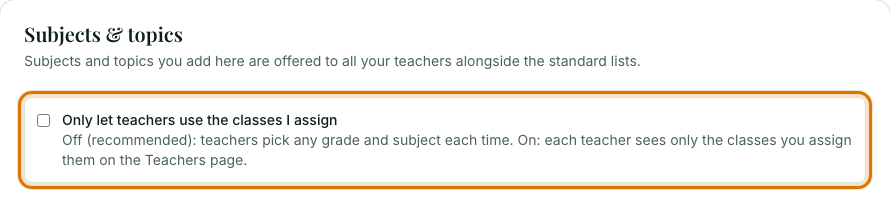
The switch Only let teachers use the classes I assign is off by default, which is recommended: teachers pick any grade and subject each time. Turn it on and each teacher sees only the classes you assigned to them on the Teachers page.
Add your school's own subjects
Under Your school's own subjects, choose a grade, type the subject and select Add subject. Everyone at your school is then offered it for that grade.

Add your own topics
Under Your school's own topics, choose the grade and subject, type a topic, for example a chapter from your textbook, and select Add topic. They appear after the standard topics for that class.

Save your changes
Select Save changes at the bottom of the form.
Follow your teachers' progress
On your Overview page, Teacher progress shows the topics each teacher has covered in each class, in the recommended teaching order, and what is next.
Frequently asked questions
- Should I lock teachers to assigned classes?
- It is off by default and recommended off, so teachers pick any grade and subject each time. Turn it on only if you want each teacher to see just the classes you assign.
- Can I add my school's textbook chapters as topics?
- Yes. Under Your school's own topics choose the grade and subject, type the chapter and select Add topic, then Save changes.
- How do I see which topics each teacher has covered?
- On your Overview page, the Teacher progress card lists the topics covered in each class, in teaching order, and what is next.
Ready to set up your school? Register a school and start with a 7-day trial of School Starter or School Pro.
Keep reading
- Manage your teachers: See who is on your roster, assign classes, and disable or enable an account.
- Your Overview page explained: What the cards and numbers on a school admin's home page mean.
- Choosing your class, subject and topic: How the Level, Grade, Subject and Topic boxes work, and how to add your own.
- Your own subjects and topics: Add a subject or topic that is not in the list, and see or remove what you have added.
- About the School Admin Dashboard: what it does and who it is for.